
Gemini OCR vs JigsawStack vOCR
Following the footsteps of our previous benchmarking of Mistral OCR, we now put Google's Gemini OCR to the test against JigsawStack vOCR. With both technologies claiming robust capabilities in text extraction, we've conducted real-world tests across a variety of document types and languages to determine which solution performs better in practical applications.
What Makes a Great OCR Solution?
Before diving into the results, let's remember the key factors that differentiate exceptional OCR solutions from basic ones:
- Multilingual text recognition capability
- Ability to process both handwritten and printed text
- Provision of precise bounding boxes for spatial positioning
- Structured data extraction and formatting
- Context understanding and intelligent interpretation
- Consistency and accuracy across various document types
Ensuring a Fair Comparison
To compare the systems fairly, we provided Gemini OCR with a structured JSON prompt that closely mirrored JigsawStack vOCR’s native output format. This prompt instructed Gemini OCR to return:
- Bounding boxes for words and lines
- Structured text sections
- Metadata, including document dimensions and detected tags
By enforcing this format, we ensured that both OCR solutions returned comparable outputs, making it easier to assess their real capabilities beyond differences in default response formatting.
Summary Comparison:
Standard Outputs
| Feature | Gemini OCR (Standard) | JigsawStack vOCR |
|---|---|---|
| Multilingual support | Moderate support, struggles with certain Asian languages | Strong support across 70+ languages including less common ones ✅ |
| Handwriting recognition | Basic recognition with moderate accuracy | Superior accuracy with context preservation ✅ |
| Bounding boxes | Not provided in standard output | Comprehensive word and line-level positioning data ✅ |
| Structured output | Good JSON formatting but requires post-processing | Native structured output with customizable fields ✅ |
| Processing speed | Fast processing (3-6 seconds) ✅ | Slightly slower (5-9 seconds) |
| Context understanding | Good basic extraction but lacks semantic understanding | Better preservation of document context and relationships ✅ |
Gemini Structured Output Request vs. JigsawStack
| Feature | Gemini OCR (Structured Output) | JigsawStack vOCR |
|---|---|---|
| Multilingual support | Moderate support but significantly slower processing | Strong support across 70+ languages with consistent performance ✅ |
| Handwriting recognition | Significantly degraded accuracy with bounding box requests | Superior accuracy maintained ✅ |
| Bounding boxes | Incomplete or inaccurate positioning data with high latency | Comprehensive word and line-level positioning data with reasonable speed ✅ |
| Structured output | Struggles with combined spatial and semantic data | Native structured output with semantic understanding ✅ |
| Processing speed | Extremely slow (30-38 seconds) when spatial data requested | Consistent performance (5-9 seconds) ✅ |
| Context understanding | Further degraded when forced into structured format | Maintains better preservation contextual relationships ✅ |
Benchmarking Methodology
We tested Gemini OCR and JigsawStack vOCR using four document types:
- Receipt Processing – Extracting totals, taxes, and itemized entries.
- Multilingual Recognition – Handling mixed-language street signs.
- Handwritten Text Recognition – Transcribing cursive and stylized handwriting.
- Structured Document Processing (PDFs) – Extracting tabular data and financial details.
Each OCR system received identical image inputs along with the corresponding prompt. We also structured the Gemini OCR request to ensure its output matched JigsawStack vOCR’s native response format using the following JSON schema:
Benchmarking Setup
Gemini OCR Request Function
Calling Gemini OCR
Calling JigsawStack vOCR
Processing Images in Parallel
Test 1: Receipt Processing
We evaluated both systems on a standard Walmart receipt containing multiple line items, taxes, and totals.
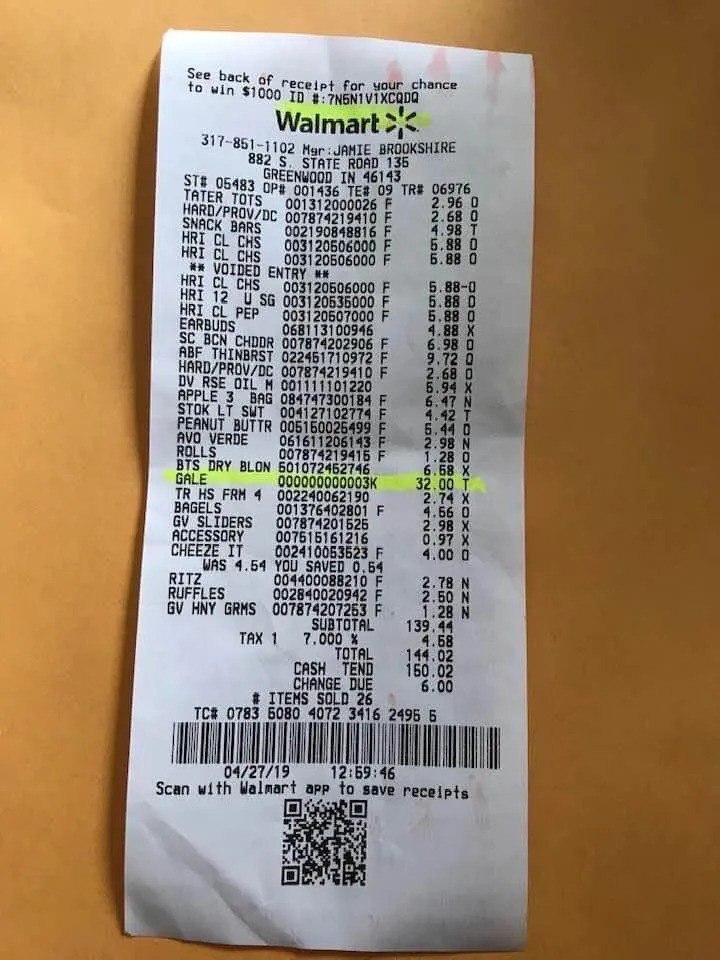
Response - Gemini OCR
Gemini with Unstructured Output:
Processed in 6.43 seconds with no spatial data
Gemini With Structured Output and Detecting Bounding Boxes:
Processed in 6.15 seconds with no spatial data
Response - JigsawStack vOCR
Processed in 9.08 seconds with comprehensive positioning data
Gemini OCR Performance (Standard Output)
- Accuracy: Good extraction of receipt data (total, tax, items)
- Processing Time: 6.43 seconds
- Output Quality: Clean JSON with essential receipt information
Gemini OCR Performance (With Structured Output Request)
- Accuracy: Similar extraction quality, but still no positioning data
- Processing Time: 6.15 seconds
- Output Quality: Failed to provide spatial data despite explicit request
JigsawStack vOCR Performance
- Accuracy: Comprehensive text extraction from the receipt
- Processing Time: 9.08 seconds
- Output Quality: Complete text capture with detailed positioning information
- Organization: Includes precise position data for each text element
Analysis: While Gemini OCR processed the receipt faster, JigsawStack vOCR delivered substantially more detail, including the exact position of each text element. Which is crucial for applications requiring spatial understanding of the document.
Test 2: Multilingual Text Recognition
We evaluated a multilingual street sign containing Japanese characters and directional information.
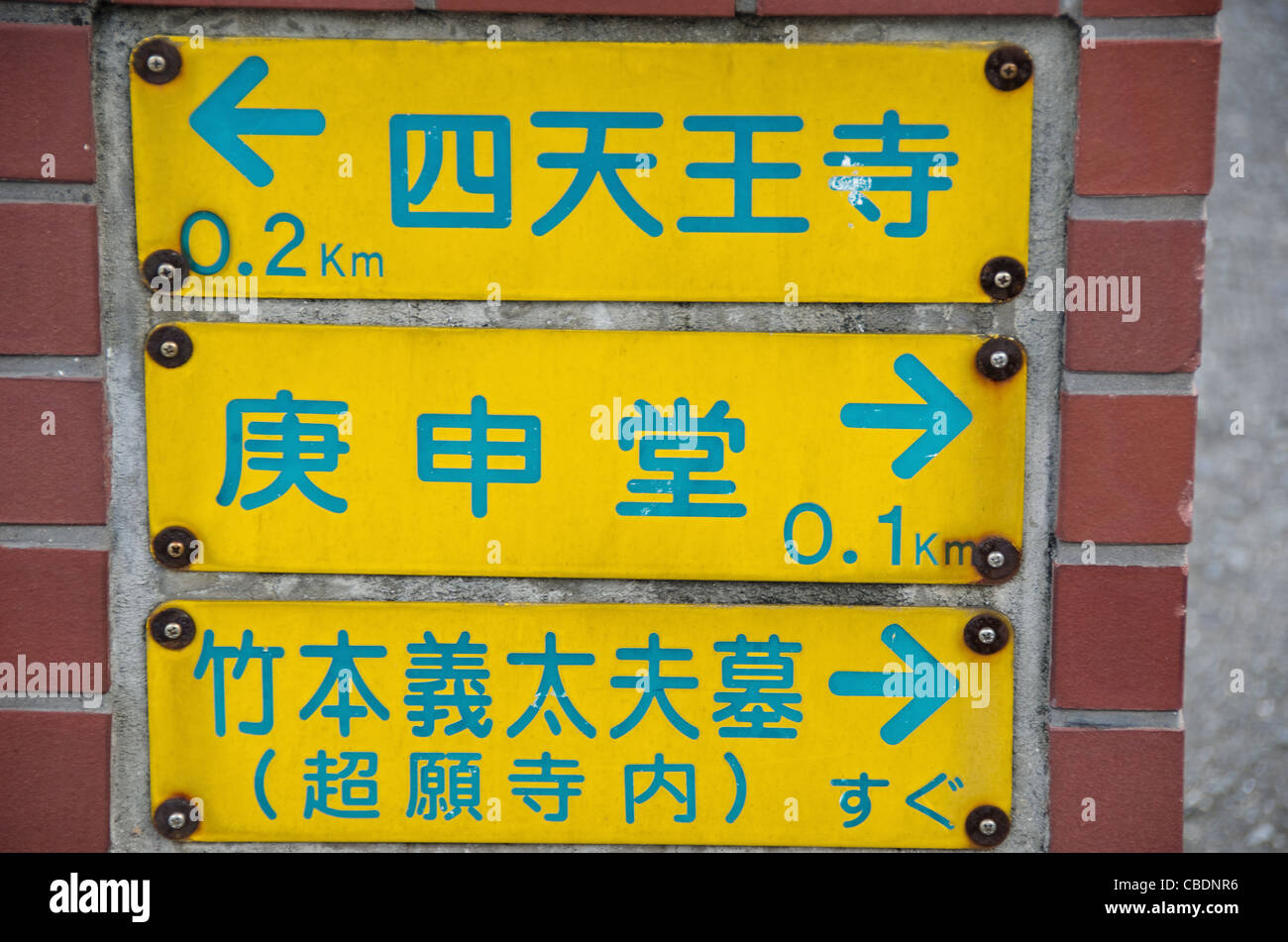
Response - Gemini OCR
Gemini with Unstructured Output:
Processed in 3.02 seconds - limited structure and context
Gemini With Structured Output and Detecting Bounding Boxes:
Processed in 30.67 seconds with spatial data
Response - JigsawStack vOCR
Processed in 6.98 seconds
Gemini OCR Performance (Standard Output)
- Accuracy: Successfully captured Japanese characters
- Processing Time: 3.02 seconds
- Output Quality: Limited structure and contextual information
Gemini OCR Performance (With Structured Output Request)
- Accuracy: Successfully captured Japanese characters
- Processing Time: 30.67 seconds
- Output Quality: Attempted to provide spatial data but with minimal context interpretation
JigsawStack vOCR Performance
- Accuracy: Successfully recognized Japanese characters
- Processing Time: 6.98 seconds (4.4× faster than Gemini's structured output)
- Output Quality: Provided both structured data and a context summary
- Organization: Included useful image tags (text, screenshot, rectangle, font, etc.)
Analysis: JigsawStack vOCR offered significantly better performance with comparable accuracy, processing the multilingual content more than four times faster than Gemini OCR's structured output while providing more meaningful context.
Test 3: Handwritten Text Recognition
We evaluated both systems on a handwritten poem with cursive and stylized text.
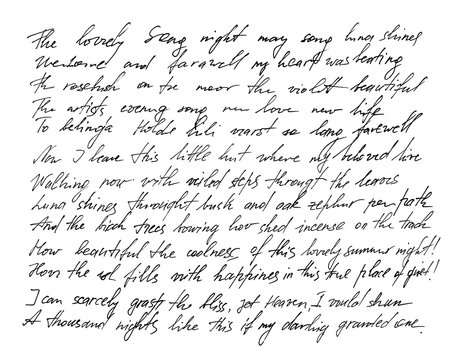
Response - Gemini OCR (Simplified):
Gemini with Unstructured Output:
Processed in 3.79 seconds - numerous transcription errors
Gemini With Structured Output with detecting bounding boxes:
Processed in 37.55 seconds - numerous transcription errors
Response - JigsawStack vOCR
Processed in 7.16 seconds - better contextual understanding and structure preservation
Gemini OCR Performance (Standard Output)
- Accuracy: Captured handwritten text with numerous transcription errors
- Processing Time: 3.79 seconds
- Output Quality: Basic text extraction without spatial context
Gemini OCR Performance (With Structured Output Request)
- Accuracy: Similar transcription errors as standard output
- Processing Time: 37.55 seconds
- Output Quality: Attempted to provide bounding boxes but with incomplete content
JigsawStack vOCR Performance
- Accuracy: Better contextual understanding of handwritten content
- Processing Time: 7.16 seconds (5× faster than Gemini's structured output)
- Output Quality: Provided both raw text and a human-readable interpretation
- Organization: Better preserved the meaning of the handwritten content
Analysis: JigsawStack vOCR demonstrated significantly better performance with improved accuracy, processing handwritten content about five times faster than Gemini OCR's structured output while delivering more contextually meaningful results.
Test 4: Structured Document (PDF) Processing
We evaluated an invoice PDF with tabular data, company information, and financial details.
Response - Gemini OCR
Gemini without prompt:
Processed in 5.34 seconds - clean structured data
Gemini With Structured Output and Detecting Bounding Boxes:
Processed in 38.17 seconds
Response - JigsawStack vOCR:
Processed in 6.39 seconds - structured with additional document metadata
Gemini OCR Performance (Standard Output)
- Accuracy: Good extraction of the invoice text
- Processing Time: 5.34 seconds
- Output Quality: Clean structured data focused on business-relevant fields
Gemini OCR Performance (With Structured Output Request)
- Accuracy: Poor extraction when prompted for structured data with bounding boxes
- Processing Time: 38.17 seconds
- Output Quality: Only produced a few lines of data with coordinates
JigsawStack vOCR Performance
- Accuracy: Excellent extraction with business context
- Processing Time: 6.39 seconds (6× faster than Gemini's structured output)
- Output Quality: Pre-structured JSON representation with items, totals, and metadata already parsed
- Organization: Data organized hierarchically with clear section demarcation
Analysis: JigsawStack vOCR excelled with dramatically better speed and more useful structured output when compared to Gemini OCR's attempt at producing structured data with bounding boxes.
Key Findings
Without Structured Data Requirements
- Speed Advantage: Gemini OCR consistently processed documents faster but provided less detailed output
- Positioning Information: JigsawStack vOCR's inclusion of comprehensive bounding box data represents a significant advantage for applications requiring spatial understanding
With Structured Data Requirements
- Performance Balance: JigsawStack vOCR offered better overall performance with faster processing times and more useful output structures
- Specialized Use Cases: Gemini OCR performed well for basic receipt processing but struggled with complex documents requiring spatial information
Overall Assessment
- Handwriting Recognition: JigsawStack demonstrated superior capabilities with greater accuracy and context preservation
- Structured Output: JigsawStack offered more flexibility in customizing extraction fields and maintaining document relationships
- Multilingual Support: JigsawStack appeared to have broader language support based on documentation and testing
Conclusion
Our benchmarking reveals that while Gemini OCR offers impressive speed for basic extraction, JigsawStack vOCR provides a more comprehensive solution with superior positional data, handwriting recognition, and structural understanding. For applications requiring detailed document analysis rather than basic text extraction, JigsawStack vOCR demonstrates clear advantages.
The choice between these solutions ultimately depends on specific use case requirements:
- If processing speed for simple text extraction is paramount, Gemini OCR may be preferable
- If spatial understanding, handwriting recognition, or detailed document structure analysis is needed, JigsawStack vOCR offers superior capabilities
Getting Started with JigsawStack vOCR
JavaScript
Python
👥 Join the JigsawStack Community
Have questions or want to show off what you’ve built? Join the JigsawStack developer community on Discord and X/Twitter. Let’s build something amazing together!