> ## Documentation Index
> Fetch the complete documentation index at: https://jigsaw-13.mintlify.app/llms.txt
> Use this file to discover all available pages before exploring further.

# Postman

> Explore and test JigsawStack APIs directly in Postman with our official collection

<img className="mx-auto" src="https://mintcdn.com/jigsaw-13/Yr5ohXUpCUOk0bXg/images/postman.png?fit=max&auto=format&n=Yr5ohXUpCUOk0bXg&q=85&s=56757f79b09c0c4f70b3c69558b3c138" alt="Postman Logo" height="150" width="300" data-path="images/postman.png" />

## Access JigsawStack APIs in Postman

Postman is a popular API platform that makes working with APIs faster and easier. With our official JigsawStack Postman collection, you can:

* **Explore** our complete API suite in an interactive environment
* **Test** API calls with pre-configured requests
* **Integrate** JigsawStack into your projects with generated code snippets
* **Collaborate** with your team on API development
* **Build workflows** using Postman's powerful features

## Getting Started

<div className="grid grid-cols-1 md:grid-cols-2 gap-6 mb-8">
  <a href="https://www.postman.com/jigsawstack-devrel/jigsawstack/overview" className="border border-gray-200 rounded-lg shadow-sm hover:shadow-md transition-shadow p-6 block no-underline text-inherit">
    <h3 className="text-lg font-bold mb-2">Fork Our Collection</h3>
    <p className="mb-4">The quickest way to get started with JigsawStack in Postman.</p>
  </a>

  <a href="https://www.postman.com/jigsawstack-devrel" className="border border-gray-200 rounded-lg shadow-sm hover:shadow-md transition-shadow p-6 block no-underline text-inherit">
    <h3 className="text-lg font-bold mb-2">Vote for JigsawStack</h3>
    <p className="mb-4">Support JigsawStack in the 2025 Postman Developers' Choice Awards.</p>
  </a>
</div>

## Setup Instructions

1. **Create a Postman account** if you don't already have one
2. **Fork the JigsawStack collection** from our [official workspace](https://www.postman.com/jigsawstack-devrel/jigsawstack/collection/xaldj48/jigsawstack)
3. **Set up your environment variables**:
   * Create a new environment in Postman
   * Add the variable `JIGSAWSTACK_API_KEY` with your API key
   * Set the `BASE_URL` to `https://api.jigsawstack.com/v1`

## Available API Categories

Our Postman collection is organized by API category, making it easy to find and test the specific functionality you need:

<div className="overflow-hidden rounded-lg border border-gray-200 shadow-sm my-8">
  <table className="min-w-full divide-y divide-gray-200">
    <thead className="bg-gray-50 dark:bg-gray-800">
      <tr>
        <th className="px-6 py-3 text-left text-xs font-medium text-gray-500 dark:text-gray-300 uppercase tracking-wider">Category</th>
        <th className="px-6 py-3 text-left text-xs font-medium text-gray-500 dark:text-gray-300 uppercase tracking-wider">Description</th>
        <th className="px-6 py-3 text-left text-xs font-medium text-gray-500 dark:text-gray-300 uppercase tracking-wider">Example Endpoints</th>
      </tr>
    </thead>

    <tbody className="bg-white dark:bg-gray-700 divide-y divide-gray-200 dark:divide-gray-600">
      <tr>
        <td className="px-6 py-4 whitespace-nowrap font-medium">Core AI</td>
        <td className="px-6 py-4">Essential AI capabilities for text and data analysis</td>
        <td className="px-6 py-4">Sentiment Analysis, Translation, Summary</td>
      </tr>

      <tr>
        <td className="px-6 py-4 whitespace-nowrap font-medium">Web & Search</td>
        <td className="px-6 py-4">Web scraping and search capabilities</td>
        <td className="px-6 py-4">AI Web Scraper, Web Search, HTML to Any</td>
      </tr>

      <tr>
        <td className="px-6 py-4 whitespace-nowrap font-medium">Computer Vision</td>
        <td className="px-6 py-4">Image analysis and processing</td>
        <td className="px-6 py-4">vOCR, Object Detection</td>
      </tr>

      <tr>
        <td className="px-6 py-4 whitespace-nowrap font-medium">Audio</td>
        <td className="px-6 py-4">Speech processing and voice capabilities</td>
        <td className="px-6 py-4">Speech to Text</td>
      </tr>

      <tr>
        <td className="px-6 py-4 whitespace-nowrap font-medium">Geolocation</td>
        <td className="px-6 py-4">Location-based services and data</td>
        <td className="px-6 py-4">Geo Search, Geocode</td>
      </tr>

      <tr>
        <td className="px-6 py-4 whitespace-nowrap font-medium">Validation</td>
        <td className="px-6 py-4">Content validation and verification</td>
        <td className="px-6 py-4">NSFW Detection, Profanity Check, Spell Check</td>
      </tr>

      <tr>
        <td className="px-6 py-4 whitespace-nowrap font-medium">File Management</td>
        <td className="px-6 py-4">Cloud-based file storage and retrieval</td>
        <td className="px-6 py-4">File Storage</td>
      </tr>
    </tbody>
  </table>
</div>

## Workflow Examples

### Example 1: Sentiment Analysis Workflow

1. Send a request to the Sentiment Analysis endpoint
2. Visualize the sentiment score in Postman's visualization tab
3. Use the response to trigger conditional follow-up requests

### Example 2: Content Generation Pipeline

1. Generate text summaries with the Summary API
2. Translate the summary to different languages
3. Convert the translated text to speech
4. Store the audio file for later use

## Postman Features for JigsawStack

### Code Generation

Easily generate code snippets for any API request in your preferred programming language:

1. Send a request in Postman
2. Click the "Code" button (<></>) in the right sidebar
3. Select your programming language (JavaScript, Python, PHP, etc.)
4. Copy the generated code to your project

### Environment Variables

Set up environment variables to easily switch between development and production:

```json theme={null}
{
  "development": {
    "JIGSAWSTACK_API_KEY": "your-development-api-key",
    "BASE_URL": "https://api.jigsawstack.com/v1"
  },
  "production": {
    "JIGSAWSTACK_API_KEY": "your-production-api-key",
    "BASE_URL": "https://api.jigsawstack.com/v1"
  }
}
```

### Response Examples

Each request in our collection includes example responses, helping you understand what to expect before making an API call.

## Handling Files with Postman

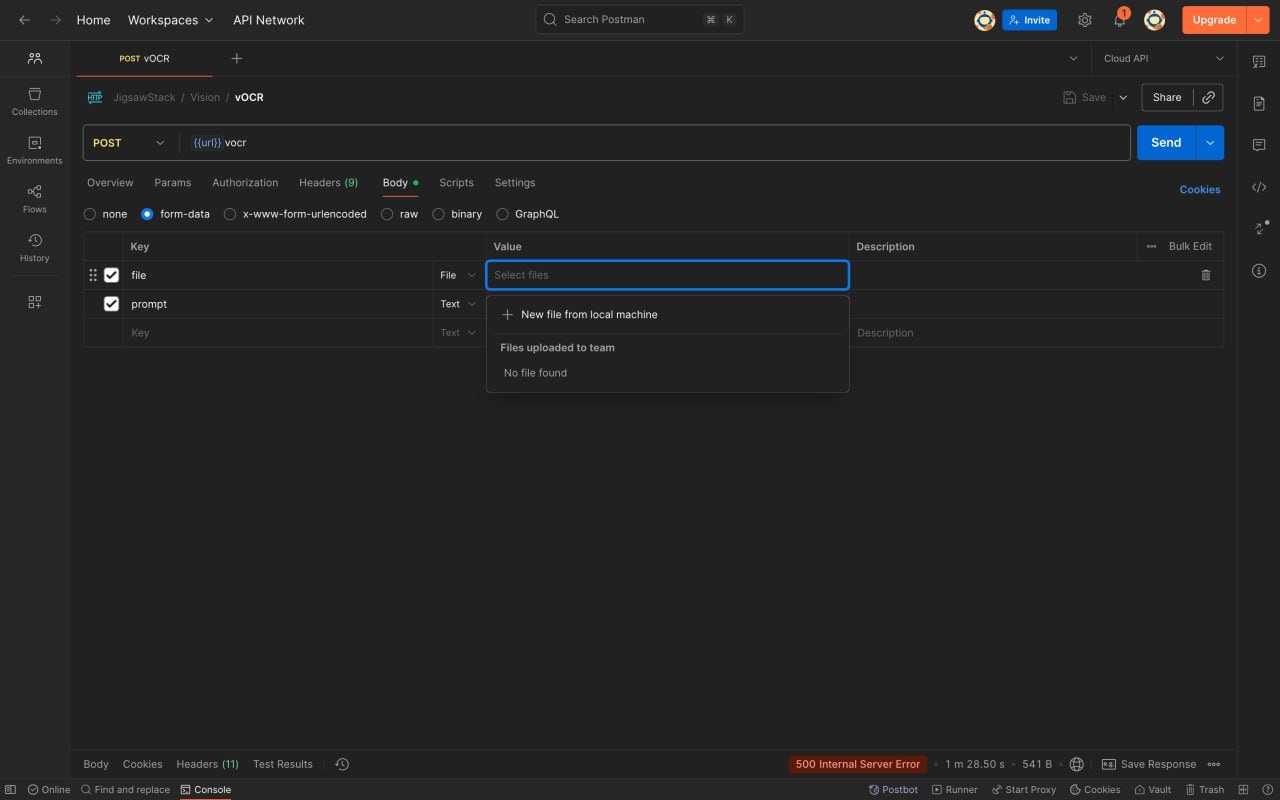
JigsawStack APIs work the same way as our SDKs, supporting all three methods: URL, file store key, and multipart/form-data. Some APIs also support direct binary uploads for maximum flexibility.

Pass the file as the `file` parameter. Additional parameters can be passed with the body. Below is a visual example of how to pass a file to the vOCR API.

<img src="https://mintcdn.com/jigsaw-13/TFjLaJhUiaV6_d-_/images/postman-example.jpg?fit=max&auto=format&n=TFjLaJhUiaV6_d-_&q=85&s=e10e26f25cff1bf92453c303fdb1d0ef" alt="Postman" width="1280" height="800" data-path="images/postman-example.jpg" />

## Community & Support

* **Join our [Discord community](https://jigsawstack.com/discord)** for questions and collaboration
* **Contribute to our collection** by suggesting improvements
* **Vote for JigsawStack** in the [2025 Postman Developers' Choice Awards](https://www.postman.com/jigsawstack)

<div className="border border-gray-200 rounded-lg shadow-sm p-6 my-8">
  <h3 className="text-lg font-bold mb-2">Need Help?</h3>
  <p>If you have questions or need assistance with the JigsawStack Postman collection, please contact <a href="mailto:support@jigsawstack.com" className="text-blue-600 hover:text-blue-800 transition-colors">[support@jigsawstack.com](mailto:support@jigsawstack.com)</a>.</p>
</div>

## Additional Resources

* [JigsawStack API Documentation](/docs/api-reference/authentication)
* [Postman Learning Center](https://learning.postman.com/)