> ## Documentation Index
> Fetch the complete documentation index at: https://jigsaw-13.mintlify.site/llms.txt
> Use this file to discover all available pages before exploring further.
# Authentication
> Secure Access to JigsawStack API & SDK.
## Retrieve your API key
* Log in to your JigsawStack [dashboard](https://jigsawstack.com/dashboard)
* Navigate to Keys tab.
* Click on `+ Create new key` button to create a new API key.
* Copy the API key and securely store it in your environment variables.
## Secret and Public keys
The JigsawStack API has two types of API keys: `secret` and `public`.
### Secret keys
* Secret API keys are great for backend services. A secret key can access all APIs without any restrictions.
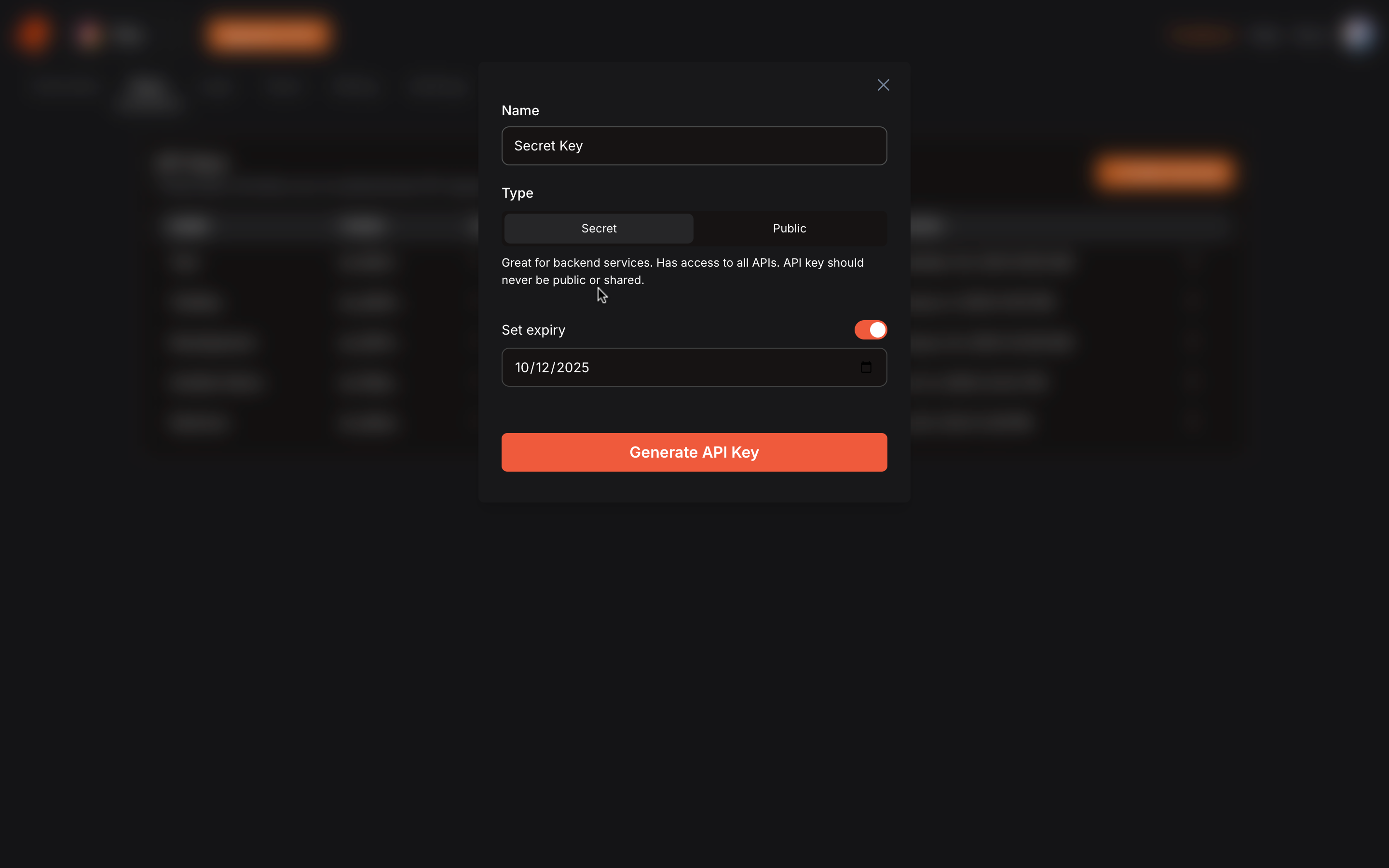 Your `secret` API key should never be public, shared or exposed in a github
repository.
### Public API keys
* Public API keys are ideal for frontend applications, allowing direct API calls from the client side. However, it's important to set public key restrictions for added security.
#### Public Key Restrictions
1. **API access** - Limits public key access to the specified APIs.
2. **Whitelist domains(routes)** - Restrict public key access to the specified domains.
Your `secret` API key should never be public, shared or exposed in a github
repository.
### Public API keys
* Public API keys are ideal for frontend applications, allowing direct API calls from the client side. However, it's important to set public key restrictions for added security.
#### Public Key Restrictions
1. **API access** - Limits public key access to the specified APIs.
2. **Whitelist domains(routes)** - Restrict public key access to the specified domains.
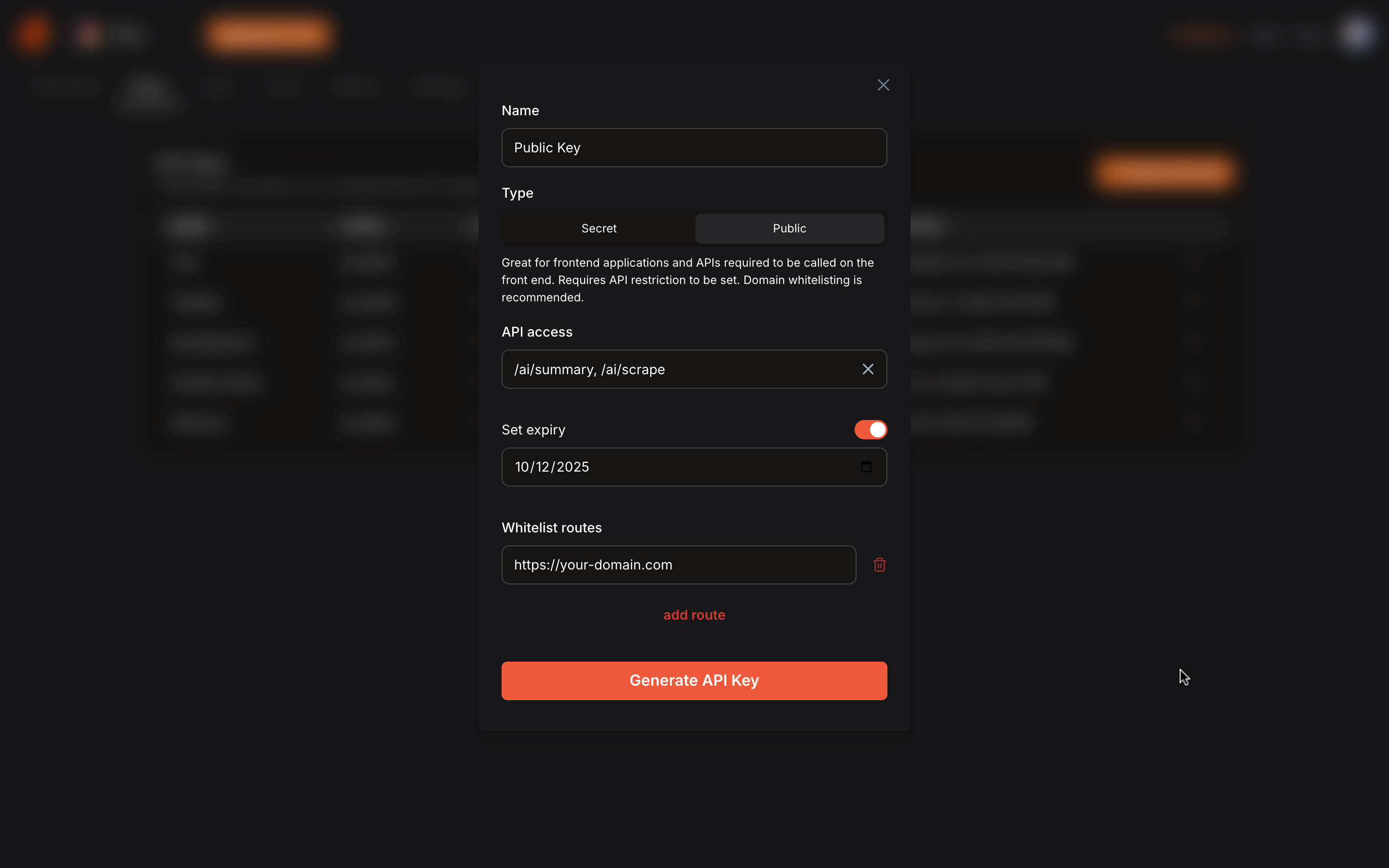 Domain whitelisting is recommended when creating `public` api keys.
## Base URL
The JigsawStack base URL is built on REST principles. We enforce HTTPS in every request to improve data security, integrity, and privacy. The base URL does not support HTTP.
Base URL `https://api.jigsawstack.com`
The JigsawStack API uses API keys to authenticate requests. You can view and manage your API keys in the JigsawStack Dashboard.
## SDK authentication
* Configure API key as an environment variable
```bash .env theme={null}
JIGSAWSTACK_API_KEY='your-api-key'
```
* Authenticate
```javascript Javascript/Typescript theme={null}
const jigsawstack = JigsawStack({ apiKey: process.env.JIGSAWSTACK_API_KEY });
```
```python Python theme={null}
jigsawstack = JigsawStack(api_key=os.environ["JIGSAWSTACK_API_KEY"])
```
## API request
* Attach the header parameter `x-api-key` with the API key obtained from your dashboard.
```js theme={null}
const headers = {
"x-api-key": "",
};
const baseUrl = "https://api.jigsawstack.com";
const result = await fetch(`${baseUrl}/v1/ai/summary`, {
method: "POST",
body: {
text: "The Leaning Tower of Pisa, or simply, the Tower of Pisa, is the campanile, or freestanding bell tower, of Pisa Cathedral",
},
headers,
});
```
* You can also add `x-api-key` as query parameter.
```js theme={null}
const baseUrl = "https://api.jigsawstack.com";
await fetch(`${baseUrl}/v1/ai/summary?x-api-key=`);
```
`x-api-key` as query parameter only works for public API keys.
## Protecting against key leakage.
* Avoid storing keys in source code repositories (e.g., GitHub). Bad actors often scan public repositories for leaked keys. Even if the repository is private, it can still be accessed by team members in their development environments.
* Never embed secret keys directly in applications. Instead, read them from environment variables to keep them secure.
* Use only public keys in client-side applications. Ensure that you whitelist specific domains that can access this public key to prevent unauthorized use.
* Store secret keys in secure key management systems (KMS). When creating a key (e.g., from the JigsawStack Dashboard), it will only be revealed once. Immediately copy the key to a KMS, which is designed to handle sensitive information with encryption and access controls. Ensure that you don't leave a copy of the key in any local files.
Domain whitelisting is recommended when creating `public` api keys.
## Base URL
The JigsawStack base URL is built on REST principles. We enforce HTTPS in every request to improve data security, integrity, and privacy. The base URL does not support HTTP.
Base URL `https://api.jigsawstack.com`
The JigsawStack API uses API keys to authenticate requests. You can view and manage your API keys in the JigsawStack Dashboard.
## SDK authentication
* Configure API key as an environment variable
```bash .env theme={null}
JIGSAWSTACK_API_KEY='your-api-key'
```
* Authenticate
```javascript Javascript/Typescript theme={null}
const jigsawstack = JigsawStack({ apiKey: process.env.JIGSAWSTACK_API_KEY });
```
```python Python theme={null}
jigsawstack = JigsawStack(api_key=os.environ["JIGSAWSTACK_API_KEY"])
```
## API request
* Attach the header parameter `x-api-key` with the API key obtained from your dashboard.
```js theme={null}
const headers = {
"x-api-key": "",
};
const baseUrl = "https://api.jigsawstack.com";
const result = await fetch(`${baseUrl}/v1/ai/summary`, {
method: "POST",
body: {
text: "The Leaning Tower of Pisa, or simply, the Tower of Pisa, is the campanile, or freestanding bell tower, of Pisa Cathedral",
},
headers,
});
```
* You can also add `x-api-key` as query parameter.
```js theme={null}
const baseUrl = "https://api.jigsawstack.com";
await fetch(`${baseUrl}/v1/ai/summary?x-api-key=`);
```
`x-api-key` as query parameter only works for public API keys.
## Protecting against key leakage.
* Avoid storing keys in source code repositories (e.g., GitHub). Bad actors often scan public repositories for leaked keys. Even if the repository is private, it can still be accessed by team members in their development environments.
* Never embed secret keys directly in applications. Instead, read them from environment variables to keep them secure.
* Use only public keys in client-side applications. Ensure that you whitelist specific domains that can access this public key to prevent unauthorized use.
* Store secret keys in secure key management systems (KMS). When creating a key (e.g., from the JigsawStack Dashboard), it will only be revealed once. Immediately copy the key to a KMS, which is designed to handle sensitive information with encryption and access controls. Ensure that you don't leave a copy of the key in any local files.